Mon-Fri 08:00-21:00
CUSTOMER RATING 707 (4.8)
DE flagEN flag
Overview of the GPS tracker app features 1Overview of the GPS tracker app features 2Overview of the GPS tracker app features 3Overview of the GPS tracker app features 4

Free Feature Upgrade: The Mobile App Guide for the New Vehicle Tracking System

Efficient fleet management begins with ease of use. The latest update makes monitoring your car and truck fleet as well as personal tracking even more transparent.

Best of all, the upgrade is completely free of charge – whether you use a car GPS tracker without a subscription, operate an active subscription-based vehicle tracking system, or rent one of our premium GPS tracking devices.

Enjoy maximum security with our Europe-wide real-time 4G tracking, designed for both private car tracking and commercial fleets.

Instructions in 4 steps:

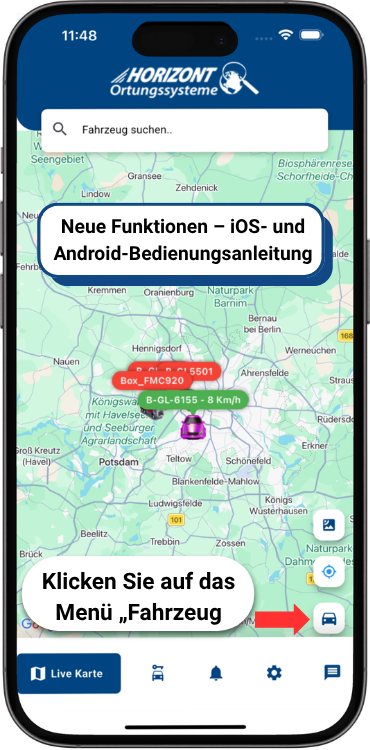
  1. 1. Open the app

    Start your GPS car tracker app on the “Live Map” screen and tap the “Vehicle” menu item in the bottom-right corner.

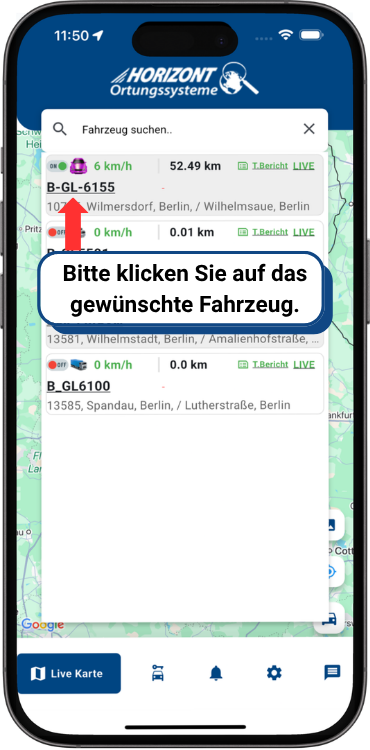
  2. 2. Select the system

    Choose the required vehicle tracking system from the list to view its current status, including position and speed.

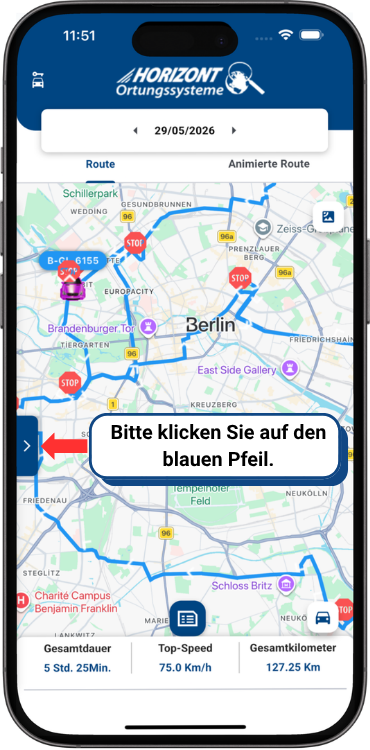
  3. 3. Expand the menu

    Whether you track cars, trucks, construction machinery, agricultural machinery, or motorhomes, tap the blue arrow on the left to open the advanced analysis menu.

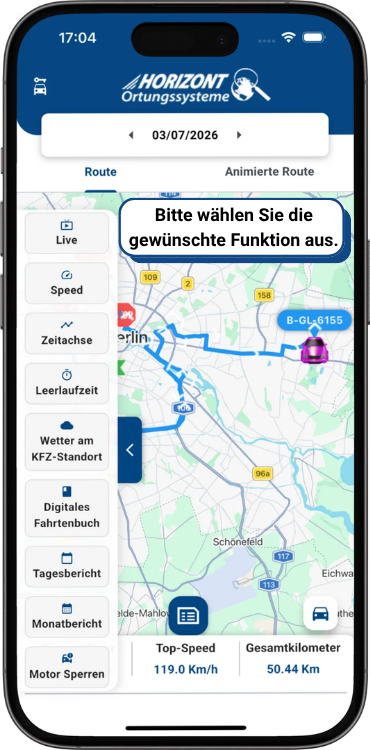
  4. 4. Stay in control with updates from every 2 seconds

    Benefit from ultra-fast data updates starting at two-second intervals and use the tools in the sidebar:

    • Live Tracking: Follow real-time locations directly at any time.
    • Speed: Monitor and analyze vehicle speeds.
    • Timeline & Routes: Display animated route histories clearly.
    • Reports: Access idling, daily, and monthly reports.
    • Engine Immobilization: Disable the engine remotely in an emergency.

GPS Tracker App Features for Vehicle Tracking

Our GPS tracker app brings vehicle tracking, live maps, route history, geofencing, logbook tools, alerts and maintenance planning into one clear software environment for daily use and fleets.

GPS Tracker App With Map Overview

View all vehicles, locations and movements on one central live map.

Live Tracking for Cars, Trucks and Fleets

Follow current vehicle positions almost in real time through app and web portal.

Vehicle Details Within Easy Reach

Combine tracking, route history, device status and service information for each vehicle.

Route History With Digital Logbook

Analyze past trips, mileage, dwell times and routes in a traceable way.

View Routes as Playback

Review completed trips step by step on the map.

Geofencing for Zones and Theft Protection

Mark areas and receive alerts for entry, exit or unauthorized movement.

Remote Device Management

Check tracker status and run supported commands through app or portal.

Plan Maintenance and Service

Use reminders for oil changes, inspections, brakes, tachograph and other dates.

Notifications for Important Events

Receive alerts for geofencing, ignition, movement, speed, battery and service.

Assign Drivers and Vehicles

Make driver use, operating times and fleet behavior more transparent.

Analytics and Trip Reports

Export trips, mileage, times and usage as daily or monthly reports.

Communication With Drivers

Use one-to-one and group chats directly in the tracking environment.

Related Topics for the GPS Tracker App

Compare features, devices and plans when you want to use vehicle tracking by app more effectively.

GPS Expertise for 20 Years

For 20 years we have been developing individual GPS tracker software solutions in Berlin.

Call Center

Contact Us

* Required fields. Your data will be treated confidentially and processed in accordance with GDPR.

Call now
Cookie Settings

We use cookies to provide you with the best experience on our website. Some cookies are essential while others help us improve our site.